If you search "AI real estate video maker," you'll find a dozen tools that all promise the same thing: turn your listing photos into a polished video in minutes.
They're not all the same. Some use AI to modify your photos (adding fake furniture, changing skies, simulating drone footage). Others keep your photos exactly as-is and focus on sequencing, pacing, and music. Some require you to upload files manually. Others read your listing URL directly.
We tested seven tools and compared them on what actually matters to working agents: speed, cost per video, output quality, editing flexibility, and one factor that most comparison articles ignore — whether the tool changes your original listing photos.
Here's what we found.
TL;DR: Quick Recommendations
| Use Case | Best Tool | Why |
|---|---|---|
| Speed & daily posting | Reel Labs | 2-min generation, paste URL, done |
| Drone flyover simulations | AutoReel | Best fake-drone effects in the market |
| 4K cinematic quality | Reel-E | Premium output, premium price |
| Virtual staging + video | Pedra | Staging and video in one platform |
| AI presenter / talking head | VibePeak | 300+ AI avatars |
| Easiest for beginners | Animoto | Drag-and-drop, no AI complexity |
| Free / zero budget | FlexClip | Usable free tier with templates |
The Comparison Table
| Feature | Reel Labs | AutoReel | Reel-E | PhotoAIVideo | VibePeak | Animoto | FlexClip |
|---|---|---|---|---|---|---|---|
| Price | Free / $29.9/mo | Free + paid | From $44/mo | Free / $29 / $79 | Paid | ~$8/mo | Free + paid |
| Cost per video | ~$2 | Unknown | $4-16 | Unknown | Unknown | Unlimited | Unlimited |
| Generation time | ~2 min | 10-15 min | ~2 min | <5 min | Unknown | Manual | Manual |
| Paste URL to generate | Yes | Yes (Zillow/Realtor.com) | No | No | No | No | No |
| AI script writing | Yes (LLM) | Basic | No | Basic | Yes | No | No |
| Beat-sync music | Yes | No | Yes | No | No | No | No |
| AI voiceover | Yes | Yes | No | Yes | Yes (avatar) | No | No |
| Post-generation editing | Yes (full editor) | Limited | No | Limited | No | Yes (manual) | Yes (manual) |
| Output formats | 9:16, 16:9, 1:1 | Multiple | 9:16, 16:9, 1:1 | Multiple | 9:16 | Multiple | Multiple |
| Max resolution | 1080p | Unknown | 4K | Unknown | 1080p | 1080p | 1080p |
| Modifies original photos | No | Yes (drone sim) | No | Yes (AI motion) | N/A | No | No |
Now let's go deeper on each.
1. Reel Labs — Best for Speed and Daily Posting
Price: Free (60 credits/mo) / Pro $29.9/mo (600 credits/mo) Cost per video: ~$2 Generation time: ~2 minutes Best for: Agents who want zero-friction video for every listing
Reel Labs takes the "paste a URL" approach to its logical extreme. Copy a Zillow, Redfin, or Realtor.com link, pick a style, and get a finished video in about 2 minutes. No photo downloading, no uploading, no timeline editing.
What sets it apart:
The AI doesn't just make a slideshow. It uses an LLM to actually read the listing, understand the property's selling points, and write a custom script. That script drives the voiceover, caption timing, and scene sequencing. A waterfront condo gets different pacing and language than a suburban starter home.
The beat-sync feature times photo transitions to the music — cuts land on the beat, not at random intervals. This is the difference between a video that feels "edited" and one that feels like a slideshow.
Here are a few examples from different styles — beat-sync, cinematic landscape, and voiceover-driven:
Three different styles from the same platform — editorial luxury, beat-sync social, and dynamic intro. Each generated in under 2 minutes.
Landscape (16:9) cinematic walkthrough — the same tool also supports horizontal formats for YouTube and MLS platforms.
After generation, you get a full editor. You can drag clips, swap photos, edit the script text, adjust voiceover, and re-render. Most AI tools give you a final output and that's it. Here, you can iterate.
Content variety: Beyond standard listing videos, Reel Labs supports multiple video types:
- Beat-sync listing videos — Fast-paced, music-driven property showcases
- Voiceover listing videos — AI narration walking through the property
- Community/neighborhood videos — Introduce the area around the listing
- School district videos — Automatically pulls nearby school ratings and maps
- Weekly market reports — Data-driven local market summary videos
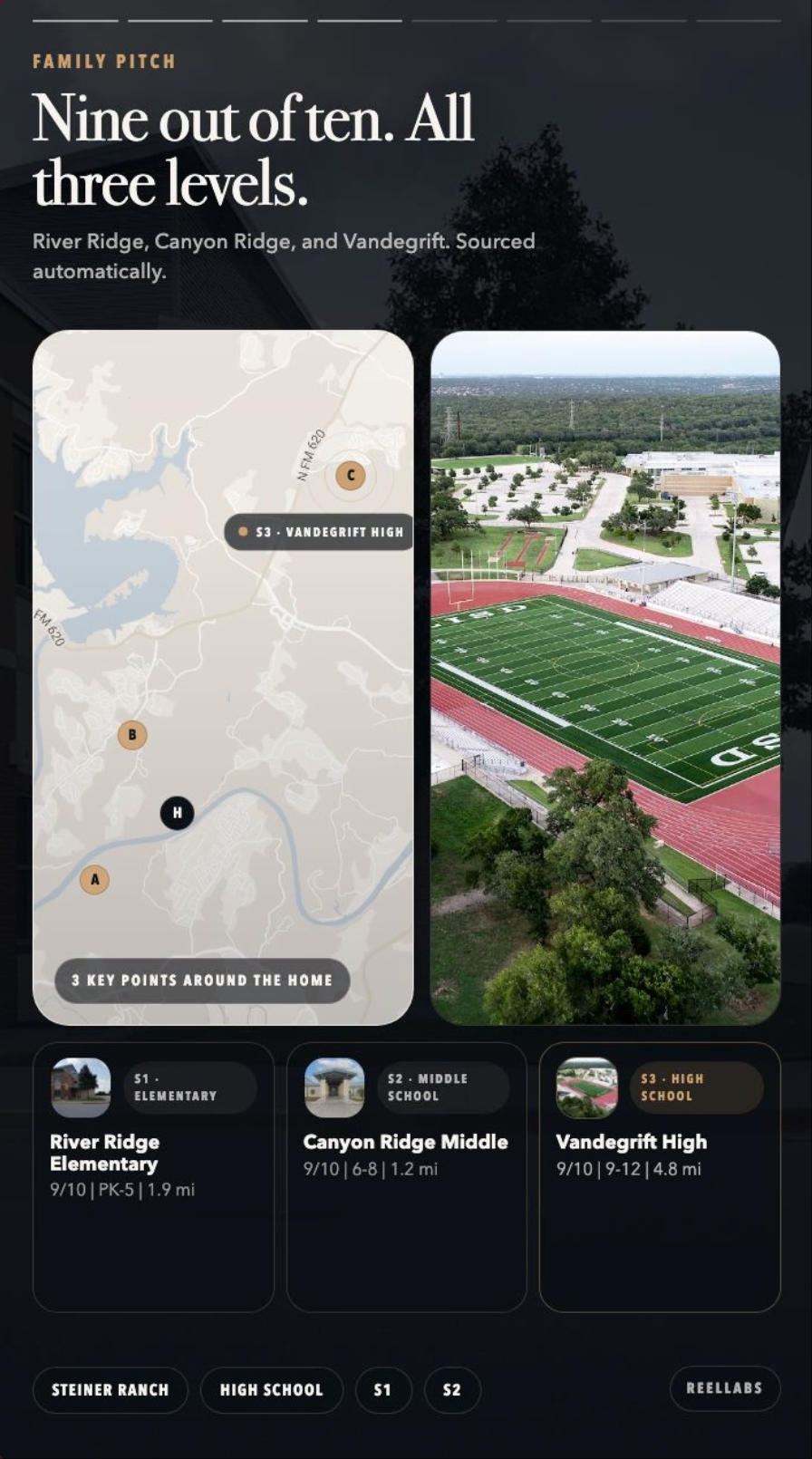
The school district feature pulls ratings, grade levels, and distances for nearby schools and creates a visual map — data that matters to families but takes agents hours to compile manually.
Weekly property report videos are generated automatically from market data for your farm area — content that keeps you visible on social media between listings.
What to know: Max resolution is 1080p (not 4K). If you need ultra-high-res for luxury marketing materials printed on a big screen, this won't be enough. For social media (TikTok, Reels, Shorts), 1080p is the standard and looks sharp.
The key differentiator: Reel Labs does not use AI to modify your listing photos. No virtual staging, no sky replacement, no simulated drone movement. Your photos appear exactly as the photographer delivered them. More on why this matters below.
Try Reel Labs free — no credit card required
2. AutoReel — Best for Drone-Style Flyovers
Price: Free tier (watermarked) + paid plans Generation time: 10-15 minutes Best for: Agents who want cinematic drone-simulation effects
AutoReel's headline feature is its drone flythrough simulation. It takes your listing photos and uses AI to generate a fake aerial fly-around effect, making it look like a drone orbited the property.
Strengths:
- Direct import from Zillow and Realtor.com URLs
- The drone simulation effect is genuinely impressive
- AI virtual staging for empty rooms
- AI photo enhancements (twilight conversions, lawn touch-ups)
- Multiple voiceover options
Weaknesses:
- 10-15 minute generation time (significantly slower than alternatives)
- The AI modifies your original photos (adds furniture, changes lighting, simulates perspectives that don't exist)
- Limited post-generation editing
- 15-20 photos per video limit depending on plan
AutoReel is a strong choice if drone-style visuals are your priority and you're OK with AI-enhanced photos.
3. Reel-E — Best for 4K Cinematic Quality
Price: From $44/month (~$4-16 per video) Generation time: ~2 minutes Best for: Agents who want the highest output quality
Reel-E positions itself as the premium option. Its camera motion system creates smooth orbits, push-ins, and pull-outs that mimic real cinematography rather than simple Ken Burns zooms.
Strengths:
- 4K resolution output
- Best-in-class camera motion quality
- Beat-sync music
- Multiple output formats (16:9, 9:16, 1:1)
- 18,000+ agents using the platform
Weaknesses:
- Higher price ($44/mo minimum, $4-16 per video)
- No URL-based generation (you upload photos)
- No post-generation editor — what you get is what you get
- No AI script writing or voiceover
- No community/school/market report videos
If budget isn't a concern and you want the sharpest possible output for a smaller number of key listings, Reel-E delivers.
4. PhotoAIVideo — Best for Photo Animation Quality
Price: Free / Creator $29/mo / Pro $79/mo Generation time: Under 5 minutes Best for: Agents who want their photos to look like moving footage
PhotoAIVideo focuses on making still photos look like actual video footage. It adds parallax effects, realistic reflections, and cinematic camera movements that go beyond the standard zoom-and-pan approach.
Strengths:
- Impressive photo-to-video motion quality
- Integration with Zillow, Realtor.com, Trulia for distribution
- AI avatar clones for property tours
- Custom branding
- Batch processing for teams
Weaknesses:
- No URL-based auto-generation (you upload photos)
- AI modifies photos to create motion effects
- Higher price for full features ($79/mo Pro)
- Steeper learning curve than simpler tools
5. VibePeak — Best for AI Presenter Videos
Price: Paid plans (pricing varies) Best for: Agents who want an AI avatar presenting the property
VibePeak takes a different approach entirely. Instead of photo slideshows with music, it creates videos where an AI avatar talks to the camera about the property. Think "virtual agent" presenting the listing.
Strengths:
- 300+ AI avatars to choose from
- Auto-generated scripts
- 300+ natural voices in 100+ languages
- Social media optimized output
Weaknesses:
- No drone effects or cinematic camera motion
- No virtual staging or MLS integration
- Avatar quality varies (some look uncanny)
- Not specialized for real estate specifically
If your brand strategy involves having a consistent "face" presenting your listings and you want to test the AI avatar approach, VibePeak is the tool to try.
6. Animoto — Best for Beginners
Price: ~$8/month Best for: Agents who want manual control with drag-and-drop simplicity
Animoto is the veteran in this space. It's not AI-powered in the way the other tools are — you manually upload photos, arrange them on a timeline, pick a template, and add music. It's essentially a simplified video editor.
Strengths:
- Extremely easy to learn
- Affordable monthly subscription with unlimited videos
- Large template library
- Full manual control over every element
- Established brand, reliable product
Weaknesses:
- No AI automation — you do everything manually
- Template-based output tends to look generic
- No URL-based generation
- No AI voiceover, scripting, or beat-sync
- Basic animation effects (no cinematic motion)
- Time: 15-30 minutes per video
Animoto makes sense if you value creative control over speed, or if you're making videos for non-listing content (open house invites, agent branding) where templates work well.
7. FlexClip — Best Free Option
Price: Free tier available / paid plans for premium features Best for: Budget-conscious agents just getting started with video
FlexClip offers a functional free tier with access to templates, a stock media library, and basic editing tools. It's a general video editor, not real estate specific, but it has enough templates to get started.
Strengths:
- Genuinely usable free tier
- Stock photo and video library included
- Designer templates for various use cases
- Browser-based, no software to install
Weaknesses:
- No AI automation for real estate
- Free videos are watermarked and lower resolution
- Not optimized for listing content
- Manual upload and arrangement required
FlexClip is a starting point, not a long-term solution. Once you're producing more than 2-3 videos per month, the time cost of manual editing makes an AI tool worth the subscription.
The Question Nobody Asks: Does the Tool Change Your Photos?
This is the elephant in the room that most comparison articles skip.
Several AI video tools use artificial intelligence to modify your listing photos. They add virtual furniture to empty rooms. They simulate drone perspectives that never existed. They change the sky from overcast to sunset. They add motion parallax that creates the illusion of 3D space from a 2D photo.
The results look impressive in the video. But here's the problem:
A buyer watches your AI-enhanced video, falls in love with the property, then shows up for a viewing.
The rooms are empty (no furniture). The sky is gray (not golden hour). The backyard looks different from ground level than from the simulated drone angle. The kitchen doesn't have that depth effect.
"This doesn't look like the video."
That's a trust problem. And in real estate, trust is everything.
NAR's Code of Ethics requires that marketing materials present properties honestly. While virtual staging is legal with disclosure, the line gets blurry when AI is automatically enhancing photos without the agent explicitly choosing each modification.
Tools that modify photos: AutoReel (drone simulation, virtual staging, sky replacement), PhotoAIVideo (parallax motion, AI enhancement), Pedra (virtual staging)
Tools that preserve original photos: Reel Labs, Animoto, FlexClip (these use your photos exactly as-is and add motion through camera movement and transitions)
This doesn't mean photo-modifying tools are bad. Virtual staging has been an industry practice for years. But you should know what the tool is doing to your images and whether that matches your brand's approach to marketing.
If your selling point as an agent is "what you see is what you get" honesty, choose a tool that respects that.
Beyond the Listing Video: A Content Strategy Most Agents Miss
Here's what separates agents who "post a video sometimes" from agents who build a real social media presence:
One listing should generate five or more videos. Not one.
Most AI video tools only do one thing: turn listing photos into a listing video. That's step one. But the agents dominating Instagram and TikTok in 2026 are using each listing as a content engine:
Video 1: The Listing Showcase
The standard beat-sync or voiceover video showing the property. This is what every tool in this article does.
Video 2: The Neighborhood Introduction
"Welcome to Steiner Ranch" — a video covering the community: nearby restaurants, parks, shopping, commute times. Buyers don't just buy a house; they buy a neighborhood.
Video 3: The School District Breakdown
For family-oriented markets, this is gold. Show the nearby elementary, middle, and high schools with ratings, distances, and grade levels. Parents will save and share this video.
Video 4: The Commute Video
"Your commute from this home to downtown Austin: 22 minutes." Create a personalized video for a specific buyer showing their daily drive.
Video 5: The Weekly Market Report
Every week, post a 60-second video summarizing your farm area: new listings, price changes, homes sold, average days on market. This positions you as the local expert and keeps your content calendar full even when you don't have active listings.
Most tools on this list can only do Video 1. Only a few support the broader content types (community, school, market reports) that build a real content strategy.
The agent who posts one listing video per month gets lost in the algorithm. The agent who posts 3-4 videos per week — mixing listings, community content, and market data — becomes the agent that people think of when they think of that neighborhood.
How We Evaluated These Tools
For each tool, we tested:
- Workflow friction — How many steps from "I have a listing" to "I have a video"?
- Generation speed — From input to finished video
- Output quality — Does it look professional enough to post under your name?
- Editing flexibility — Can you fix things after generation?
- Cost efficiency — What does it actually cost per video at realistic usage?
- Photo integrity — Does the tool modify your original photos?
- Content versatility — Can it produce more than just listing videos?
We weighted workflow friction and cost efficiency highest, because for most agents, the #1 barrier to video marketing isn't quality — it's the time and effort required to produce videos consistently.
Final Recommendation
There's no single "best" tool. It depends on your priorities:
-
"I want the fastest, cheapest way to get every listing on video" → Reel Labs. Paste a URL, 2 minutes, done. ~$2/video.
-
"I want the most impressive-looking video for a key listing" → Reel-E. Higher cost, but premium cinematic quality at 4K.
-
"I want drone-style effects without hiring a drone operator" → AutoReel. Just know that the AI is generating perspectives your photographer didn't actually capture.
-
"I want virtual staging and video together" → Pedra. One platform for both.
-
"I want full manual control and I enjoy editing" → Animoto. Reliable, affordable, no AI surprises.
-
"I want to start for free with zero budget" → FlexClip or Reel Labs free tier.
The real question isn't "which tool is best." It's "which tool will I actually use every week?" The fanciest video tool in the world doesn't help if it sits unused because the workflow takes too long.
Pick one. Test it with your next listing. Post the video. Then decide if you want to keep going.
Frequently Asked Questions
How much does an AI real estate video maker cost?
Prices range from free (FlexClip, Reel Labs free tier) to $79/month (PhotoAIVideo Pro). Most agents will spend $29-44/month. At that price, if video helps you close even one additional deal per year, the ROI is roughly 100x.
Can AI-generated videos replace professional videography?
For social media content (TikTok, Reels, Shorts), yes. For luxury listings above $2M where sellers expect cinematic walkthrough footage with a gimbal, probably not yet. The sweet spot is using AI for your volume listings and reserving professional videography for your highest-value properties.
Do these tools work with MLS systems other than Zillow?
Most URL-based tools work with any public listing page (Zillow, Redfin, Realtor.com). Some also accept direct photo uploads from your local MLS. Check each tool's documentation for specific MLS integrations.
Will buyers know the video was made by AI?
A well-made AI listing video is indistinguishable from a manually edited one. The transitions, text overlays, and music feel professional. What buyers will notice is if the video shows AI-modified photos that don't match reality — which is why photo integrity matters.
How many videos should I post per week?
The agents seeing the most growth are posting 3-5 times per week on Instagram Reels and TikTok. This sounds like a lot, but with AI generation, you can batch-create a week's content in 30 minutes. Mix listing videos with community content and market updates to avoid being repetitive.